What Nobody Tells You After "I Built an Agent"
The tutorials all end the same way. The agent works. It classifies the ticket, routes the email, summarizes the document. You run it a few times, it looks good, you ship it.
Three weeks later it's hallucinating customer data at 2 AM, retrying in an infinite loop, burning $400 of API credits overnight, and you're getting paged because the support queue has 300 unrouted tickets.
The gap between "I built an agent" and "I run an agent" is not a capability gap. Models are good enough. The gap is everything that comes after the happy path: error handling, context management, observability, and the escalation logic nobody plans for until it's too late. Most tutorials skip this entirely. This issue doesn't.
What a Production Pipeline Actually Looks Like
Take a concrete case: a support ticket triage agent. Tickets come in from multiple channels, need to be classified by issue type, prioritized by customer impact, and routed to the right queue. Straightforward enough to build in an afternoon. Complex enough to fail in six different ways by Tuesday.
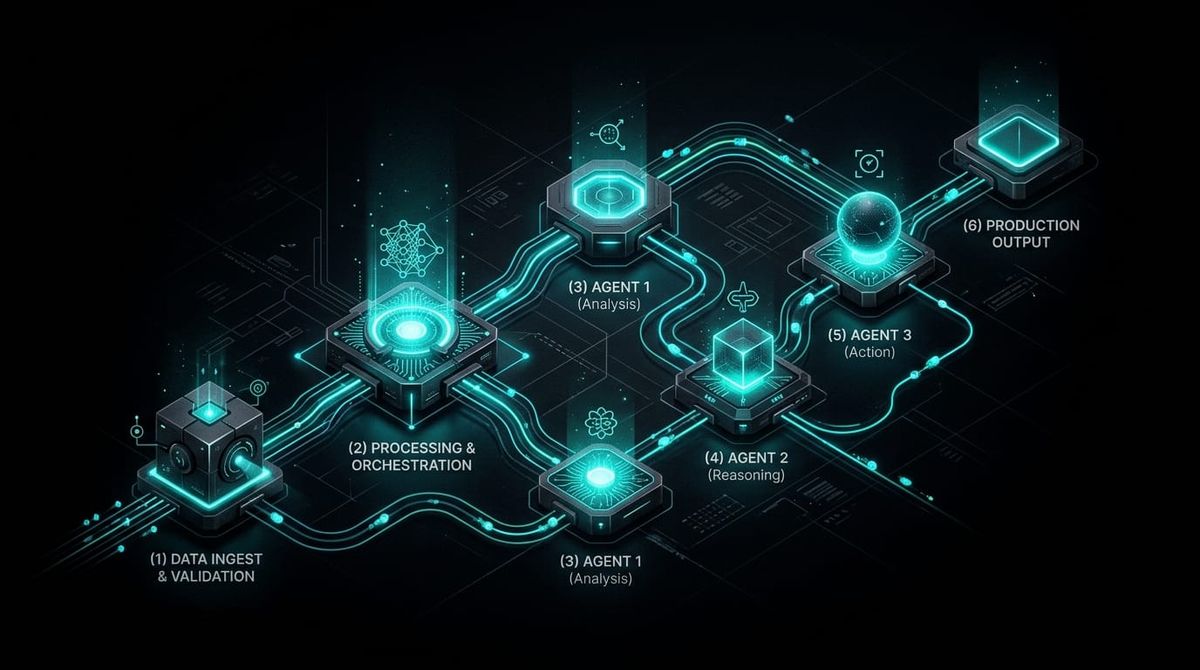
A production pipeline for this has six layers, and all six matter.
Trigger. Something has to start the run — a webhook when a ticket arrives, or a cron job polling for new ones. The trigger is boring until it breaks. Design it to be idempotent: if it fires twice for the same ticket, nothing bad should happen.
Context assembly. This happens before the LLM call. The agent needs more than the ticket body — it needs the customer's account tier, recent billing events, open incidents, and the last three support interactions. Pull all of that from your CRM and billing systems first and assemble a structured enrichment object. An LLM fed a bare ticket body and asked to prioritize it will guess. Fed a ticket body plus "enterprise account, 3 open P1s, renewed last week," it'll prioritize correctly. The 80/20 split that production teams consistently report: about 20% of a deployed agent system is model logic. The other 80% is data pipelines, context assembly, and operational infrastructure.
LLM call. One call, structured output, explicit schema. The agent classifies the issue type, assigns a priority, and flags whether the ticket meets escalation criteria. JSON output with an enum for issue_type, integer 1–4 for priority, and a boolean for escalate. Not free text. The schema constraint doesn't just make downstream processing easier — it reduces the model's ambiguity about what you want, which improves consistency.
Tool execution. Write the priority tag and issue_type back to the CRM, assign the ticket to the appropriate queue, optionally draft a first response. Each tool call is its own operation with its own error surface. Treat tool failures separately from LLM failures — they have different retry semantics.
Output validation. Before anything downstream consumes the agent's output, validate it. Check that issue_type is in your allowed enum. Check that priority is 1–4. If the escalate flag is set, verify the escalation criteria are actually present in the ticket. An output that passes schema validation but fails semantic validation should go to a dead-letter queue, not into your CRM.
Logging. Trace the entire run: input context, LLM output, tool calls, final state, token count, latency, cost. Not for debugging later — for catching problems you didn't know to look for.
Three Things That Will Break It
In roughly the order you'll hit them.
Context blowup is usually first. For a triage agent handling multi-turn conversations, context accumulates across exchanges. After 15–20 turns, the agent's attention is spread thin across a full session transcript, and it starts referencing outdated ticket state or missing recent information. The fix is deliberate: cap what history the agent sees to the last 5–6 turns verbatim, summarize closed threads into a single compressed object, and start each triage from a clean context seeded with structured enrichment data — not the full conversation log.
Silent failure is the most dangerous and the hardest to catch without instrumentation. The agent produces a plausible-looking output, all your downstream API calls return 200, and nothing raises an alert. Meanwhile, the agent routed a billing issue to the technical queue because it misclassified the ticket type, and that's been happening on 8% of tickets for four days. Traditional monitoring doesn't catch this because there's no error — the failure is semantic. The mitigation: structured output validation (described above), plus a sampling strategy where a percentage of outputs go through a secondary LLM evaluation before they're written to the CRM. For high-stakes decisions, a "judge" model that independently checks the primary agent's output is worth the extra token cost.
Token burn from retry loops hits teams that bolt on error handling without thinking through the retry budget. An API timeout triggers a retry, which times out, which triggers another retry, with exponential backoff stretching the window to minutes and the total cost to hundreds of dollars before a human notices. In multi-agent systems it gets worse — Agent A's output triggers Agent B, which fails and retriggers Agent A, creating a cycle with no natural exit. The fix: define a retry budget as a hard cap (maximum retries as a percentage of successful requests), set a step limit per agent per execution, push persistent failures to a dead-letter queue rather than retrying indefinitely, and add a circuit breaker on downstream tool calls that fail repeatedly.
Tool Spotlight: Langfuse
Langfuse (langfuse.com) is open-source, self-hostable, and the most pragmatic choice for production agent tracing.
The integration is lightweight. Wrap your agent functions with the @observe() decorator and Langfuse captures every LLM call, tool invocation, input, output, token count, and latency — without restructuring your code. Native integrations with LangChain, LangGraph, CrewAI, AutoGen, and the OpenAI Agents SDK mean most stacks work out of the box.
What makes it worth using over just logging to a database: session replay. When an agent behaves unexpectedly, you can pull the exact execution trace and step through it — inputs, intermediate outputs, tool calls, everything the model saw at each decision point. Debugging a silent failure without this is guesswork. With it, you find the failure in 10 minutes.
It also connects to your deployment workflow. Prompts are versioned in Langfuse and each trace links back to the specific prompt version that ran it. You can define a benchmark dataset of known-good inputs and run automated evaluations in your CI/CD pipeline — if the agent's behavior on golden fixtures changes, the deploy is flagged before it hits production.
Self-hosting means your traces don't leave your infrastructure. For teams handling sensitive customer data in their agent context, that's the default choice.
Builder Tip
Before you add observability tooling, add one golden fixture. Pick a real ticket your agent has handled correctly — specific customer, specific issue, specific routing outcome. Hardcode the input. Assert on the output. Run it on every deploy. If the classification or routing changes, the deploy is blocked until a human reviews it.
This takes 30 minutes to set up. It catches prompt regressions before users do. No tracing infrastructure required, no LLM-as-judge eval, no benchmark suite. One known-good input, one expected output, one assertion. Add more fixtures as you find edge cases in production. That's the foundation everything else builds on.
Gradient Push covers AI and automation for builders. If this was useful, pass it on.
Enjoying this? Subscribe to Gradient Push for practical AI and automation breakdowns — gradientpush.com